copper is gradually being removed in France, so Fibre or “a starry link” will be the only way forward (??)
OH is like a kid at Christmas with his newly acquired Fibre although I’ve had to tell him that tooo much Fibre can be detrimental… and he said he’ll cut down on the beans
I’ve just checked and we can’t actually have fibre to the house - the offers claim to be for “fibre broadband” but the advertised package speeds are no different to what I have now. They call it “hybrid fibre”…
Presumably Openreach want to get a few more years use out of the two expensive telegraph poles I got them to put up to reconnect us after the copper cable buried under our access road gave up a few years ago…
That was something which always annoyed me - the rush to label FTTC services “fibre” which left things in a very confused state when FTTP became available - so we have “full fibre” offerings. Sounds like an ad man’s description of a breakfast cereal
For now I’d just like the French providers and information sources to straighten their act out and provide reliable information - Ariase tells me I have four operators who can give me 8GB/s but visiting the operator sites tells me I can only have ADSL.
ARCEP, at least, correctly tells me I’m still “programmé” so I remain hopeful.
The reason that Ariase gets it wrong is there is infill at the borders of the commune from adjacent areas which do have fibre - if I lived just 2km to the east, or the south I could have FTTP, no problem. But the village itself does not have fibre yet.
Seamless, Angela, in my case. From Sosh to Boogie - jus’ like that! Did it for price.
The one thing I’m a bit about is the router. It seems to me to be a most basic model. It doesn’t have a WAP button for one-press connection of gizmos [printers etc] and I suspect that there’s an incompatibility with my wireless gizmos [printers/range extender]. I think more per month gets a better router, amongst other things.
Since I went Boogie I haven’t been able to connect wirelessly with printers that connected perfectly well with the Sosh router.
I’d buy myself another router if I knew that it was a simple matter to plug in the new one and all good. I don’t want to get into a rigmarole of a setup which I will inevitably mess up.
Yeah I often sit on my sofa with my work laptop and my personal laptop side by side, connected to the exact same wireless network. My crappy Dell work laptop is always much slower than my Redmibook (made by Xiaomi), despite the Dell being newer and more expensive
Yes, that’s the normal procedure. Been there. Done that. Dun’t work. I have the router p/w writ large all over the place, inc the wall above where the extender plugs in.
I vaguely remember someone suggesting it’s to do with 2.8 versus X [5?] something-or-others.
Ah! That’s the badger! I think that’s the problem.
Sadly I don’t understand that bit. Both ‘whats’ enabled?
It’s a flamin’ nuisance the router not having a WAP button. hammering out the router p/w, with all the opportunity for mistakes, does my head in after 3 goes and no result. If replacing the Boogie router with something better was +/- plug 'n play, I’d go for that.
Worth checking also if the new router broadcasts on both 2.4 & 5 GHz. I’ve got some old kit that can’t to 5GHz so I have to have both enabled (2 separate SSIDs).
I generally just change the network name and password to match the previous router’s settings. That way all of the devices are blissfully unaware that anything has changed.
Indeed it will, but only up to the maximum speed that both ends of the link support. You can have a multi gigabit Wifi7 router, but if you connect an oldish laptop to it with an older WiFi spec then you won’t be able to get anywhere near that. My Dell laptop for example only goes as high as 150mbps.
Oops yes, I forgot a word I meant to say both frequencies.
Bouygues has an article explaining what the difference is between frequencies and why one may be preferred over the other…
If you don’t care about the whys and hows, here’s a video explaining how you can separate the 2 frequencies into 2 different networks running on the same device. Each one has a slightly different name, so just make sure the older kit that has to connect to the 2.4GHz frequency uses the correct network name for the 2.4GHz network.
Some equipment can get confused, I agree. I had to set up an SSID which only my Revo Axis uses because it got very flustered when it could see a single SSID on two different channels.
What if it’s the other way round? I.E. the kit wants 5GHz but the router only does 2.4GHz? I’ve had a look at the router and it seems so basic as to have no controls or switches to alter anything. That’s why I wonder about replacing it with something better.
It’s this sort of tech-speak that may sound basic to those who know but I haven’t a clue what that means.
Yes. I think the router I’ve got may reflect the price I’m paying.
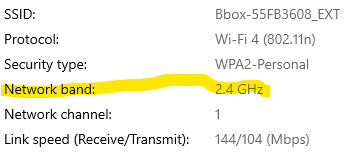
Yup. This may be the nub of it. This shows the signal from the extender but the figures for the router are exactly the same - 2.4GHz only
Anything which can do 5GHz should also be able to work with 2.4GHz - but if your router is 2.4GHz only it will be quite old so it will be worthwhile upgrading.
 although I’ve had to tell him that tooo much Fibre can be detrimental… and he said he’ll cut down on the beans

 about is the router. It seems to me to be a most basic model. It doesn’t have a WAP button for one-press connection of gizmos [printers etc] and I suspect that there’s an incompatibility with my wireless gizmos [printers/range extender]. I think more per month gets a better router, amongst other things.
 )… and hey presto… yippee
 I meant to say both frequencies.