You can drag a box around the files to select them all and then drag them across all at once. If that includes some files you don’t want, then just delete them from the new folder
1 Like
Not with my steam driven laptop you can’t 
I remember in the early days of Macs (1990) if you clicked and tried to drag too many things, a bomb graphic would appear on screen and you’d lose your work after the last save point.
Hope you’re not still using Windows 3.1
I’ll have a look at it and, if necessary give it a go tomorrow.
Can’t do that, my iphone doe not have a mouse and pics cannot be dragged out of it as far as I know.
Might try that tomorrow if this black screen mysteriously reappears.
@ChrisMann Had thought of that when I saw it, again if nothing is sorted tomorrow I’ll give it a go.
@Rachel05 Another good idea but a quick look at what Chris says looks like stuff I have already tried.
@DrMarkH As I said in answer to Vero above, as far as I know I can’t drag stuff from an iphone
Another good idea from @vero , Steam. It worked for Mallard but i really don’t want to go that fast . 
I hope I have thanked and answered you all adequately, even though hampered by a stream of blood which was heading down my arm towards the keyboard.
Don’t Panic!! just the blood thinners wreaking their revenge because I gently scraped a tree on the way back down. Antiseptic and compresses duly applied though it was a 10 minute job trying to coax every thing out and applied using one hand. Jules doesn’t like blood, so no point asking him to help. At least, I think that is his excuse, maybe he is worried that he might mistake me for a bit of steak, to be consumed. Either way, he obviously has my interest at heart. 
1 Like
David, I think you deserve a new name ‘Percy’ - short for perseverance. And if I seem to have been Miss Bossy Boots, I’m sorry but I’m being rather selfish as I just want to see your photos of the hide.
And don’t mention the word ‘steak’ in this house at the moment. Tomorrow is Ruby’s 13th birthday and she will be having some steak. Not sure if I should cook it or if she should eat it raw.
Anyway as the saying goes ’ tomorrow is another day ’ for you.
Rachel 
Is that Ruby in the picture? Happy Birthday to her anyway, just a year or so older than Jules.
Took a video of him plodding up the hill like an old man today, much like me, it really looks as if there is a heavy weight tied to the other end of that long lead.
1 Like
BREAKING NEWS!! After an hour and a half this evening, I managed to change my icloud password after at least 6 times punching those tiny keys on the iphone.
Finally I got to see my latest 2 photos and one video from this afternoon. But I couldn’t enlarge them, only select them aaaaargh!!
Then I thought if they are selected and if I can at last get back into icloud, I can see them there. And there they are. 
So, if this isn’t a giant pisstake by an evil fairie, I should be able to put them, and the others in waiting up here tomorrow. Goodnight all. 
5 Likes
First a little taster, an old man, one of two, plodding up the hill as if there was a great weight dragging on the other end of that long line:
blob:https://www.icloud.com/afefac98-032e-4d69-9239-3f0a7ebaa339
Edit: Oh What a shame, further investigation needed. 
Then the latest pictures of the bird hide. These are to demonstrate an experiment with the different methods of securing the transparent roof sheet.
It is quite tough and has a cord within it running right round the edge. Every half metre or so it has a strong metal eyelet which when I first saw it thought would be a great way to anchor it. My idea was to pull down tight on the sheet then put a wooden batten over the edge securing it with small screws passing through the eyelets into the wooden planks of the hide, thus preventing any breach of the material.
So this first picture is of the first side I did, the side facing south. I had some misgivings as I proceeded that the eyelets and the edge cord prevented the batten from being tight for all its length on the sheet. This was demonstrated later as I realised there was some slack there, but I continued on:
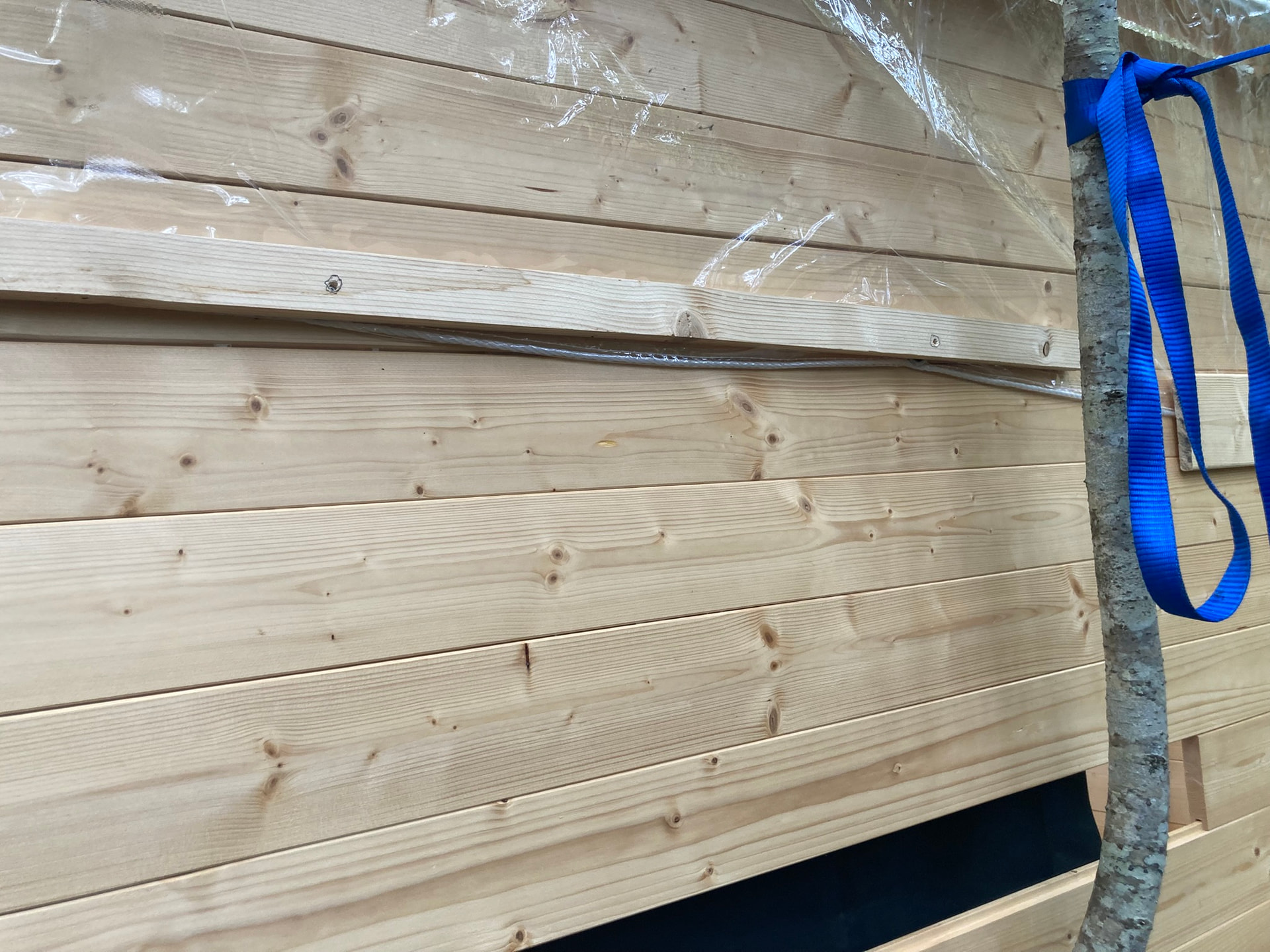
I have in mind my lorry driver training in the good old days of roping and sheeting, never have an open area facing foreward to catch the wind and rain so I had to commit the system to the corners and the front as well:

By this time I was seriously worried that I was on the wrong track. If the sheet cannot be at its tightest, water and leaves will gather requiring daily clearance to avoid destruction. So I decided to experiment with the north and east facing sides with the battens, where possible, above and clear of the cord and eyelets but with them tight for their whole length firmly trapping the sheet. The downside is that the sheet is pierced by each screw, but I am gambling on the tightness of the batten preventing any tendency for a rip to begin. Thus:

And also the east facing rear, with some difficulty because of the interference of the fence:

Not a pretty sight but I hope a safer one. I am prepared for the first 2 efforts to fail as far as tension on the roof is concerned but I really hope that the 2nd 2 are the way to go with this one (there is at least one more hide to follow but vastly different and with non of the severe difficulties encountered with this one.)
If the sheet remains intact but too slack to prevent puddles, I have a plan. 
I have several pieces of wood left over from the kit with which, suitably covered with the edge protection, can be inserted over the roof descenders but under the sheet, secured by upward facing screws, thus all done from the inside.
Anyway, finally, the reason for all this kit departing effort was something which occurred early in the construction. As the wall rose around me I would take a few minutes from time to time to relax inside on a chair. I love trees, this is surrounded by them, but it is also sheltered above by them, and gazing upwards through the non-existing roof made me regret that this would all be denied me when the heavy panels supplied were in place.
So this is the reward, to be able to gaze upwards at the gently swaying tops and maybe the intruding little, or large, bird from time to time:


I realise that all the above may not be of interest to those of you attracted to this thread by reasons of helpful technical advice but I hope you enjoy the result nevertheless.
And to @Rachel05 At last, your pictures. You have been very, well almost, patient.
3 Likes
David - the avatar photo is Annie. Our beloved fox terrier who died in 2020. This is Ruby, she is a Korthals Griffon breed.

And our other dog no longer with us is Rosie (also known as Little Sausage because she was so small) - she was an LOF wire haired terrier.

Hope you slept well !
2 Likes
I did, but woke very late again, but what a reward, 3 lovely dogs to please the canine loving eye.
1 Like
blob:https://www.icloud.com/afefac98-032e-4d69-9239-3f0a7ebaa339
Still not working.

Success, of sorts, I suppose.
4 Likes
The above instructions for transfering photos from iphone to computer by usb cable are the same or different for android phones? Thanks.
I have not read all of the comments yet, but I wanted to offer my insight as a retired television director and producer with years of experience trying to transfer data between multiple devices.
The major issue is that your Apple (iOS) phone and Windows computer run on completely different operation systems and literally do not speak the same language. This makes transferring files directly between the two a challenge. Most external hard drives, even thumb drives, will automatically format themselves to read the language of the first device they are plugged into, which makes them incompatible with any device that does not run in the same operating system.
Also, not every cable that you plug into your phone or computer is capable of transferring data. They might all look alike, but some are charging cables while others can exchange information between devices. This is why there is such a wide price range for cables that look the same, and why some seem to charge your devices faster than others - it’s not in your head, they really are different!
The simplest and most reliable way to transfer data between devices from different “families” is going to be in the cloud. If you have a Gmail account or use Google as your default search engine, this means you can install the Google Drive app on your iPhone and create a folder named “iPhone Photos” or something easy to remember, and upload your photos to that folder. There are multiple ways to do this, and I’m happy to go into more detail if you’d like.
Then, on your Windows computer, open a Google browser window, and on the top right corner next to your profile icon, you will see a 3x3 grid of small boxes, and clicking on it will open the Google App Suite menu. From here, open the Google Drive app on your computer and you should find the “iPhone Photos” folder you created and be able to download your photos onto your PC.
This process also works in reverse, and video files are more doggy to transfer than images, but it is pretty user friendly once you get the hang of it!
I hope this helps, and don’t hesitate to reach out with other questions or more detailed instructions if you’d need them, I’m happy to help!
~ Catherine K, formerly of Denver CO, now in Perigord Noir
Thank you @Catherinetk68 , that is most informative and it appears that your solution was possibly the one which was finally a success.
But in my case, I was bewildered by the fact the an account in icloud, which mysteriously appeared by magic and amazingly, to me, read and copied all recent photos to itself whenever the iphone was placed nearby, and thus I was even more bewildered when, without warning, it suddenly denied me access by demanding a password which I never had.
The route to retrieve a so called forgotten password was not immediately followed by me because it demanded arranging everything by means of the iphone. This is difficult for me, I find the tiny keys that only need an accurate touch, extremely difficult, which is why I don’t use the iphone as a phone but have a Doro flip top with which I can feel and actively press, physical buttons.
I have recorded this new password with all my others so hope that the same problem will not arise again.
With regard to the short video, that was refused transfer by icloud, even though it was on their system. The only route was to create a You Tube video and transfer it here from there.
One unfortunate result of this ‘solution’ is that I can no longer enlarge the photos on the iphone to chose whether I want to keep them or not, This can only be done on icloud now but is not so easy because that maybe a long time later when I return home.
Although I appreciate the camera of iphone and a couple of other handy features like the calculator, I am definitely not a fan of Apple because it seems to me that they make things difficult just because they can, and all this palaver has only strengthened my view.
While I get the gist of what you are saying, this is not really correct. Apple computers can work with standard FAT, Ex-FAT and Windows NTFS formatted drives (the latter with the Microsfot Tuxera extension if you wantnat to write to them).
A problem would only arise if you wanted to use a hard drive that had been formatted in Apple’s APFS/HFS+ formats directly on a Windows computer, and even then there is (paid-for) software such as OWC MacDrive that allows Windows computers to access them.
Usually it’s only drives that are inside or permanently connected to Macs that are APFS; external drives are normally left as FAT or Ex-FAT for portability.
And a Mac will not auto-format a USB drive or external hard drive to APFS - it will leave its format “as is” unless it’s unreadable for some reason.
I agree with you about cables - when buying USB cables you do need to check if they are intended for charging or data.
While copying via the Cloud may be worth exploring, a direct cable link is faster than copying stuff up and then back down. Or if you have an iCloud account that backs up iPhone photos automatically, you can just log into iCloud via a web browser to download them.
There’s also the Apple Devices app for Windows.
1 Like
David, you don’t have to use the iCloud if you don’t want to. I don’t use it at all because if you’re not careful you end up filling it and then being urged to pay for more storage or remove stuff.
Unfortunately I had inadvertently used it, like you, and had to get OH to retrieve photos I wanted to keep.
You should be able to connect your phone directly to the computer USB to USB. Your phone should ask whether you want to charge only or to transfer files, and you should select file transfer.
In your computer, in the file manager navigate to the phone and look for images - usually found in folders labelled DCIM inside the folders containing photos. From there, copy the photos across.
I do not disagree with anything you’ve said here, but I didn’t feel that David, in his already overwhelmed state, needed to hear about formatting drives, and I tried to keep it simple with regard to options he would likely not be choosing.
Also, some basic, older thumb drives (like the ones many of us have floating at the bottom of computer bags or kitchen junk drawers) DO immediately recognize the operating system of the first device they are inserted into. One with the know-how can easily unlock them with a few clicks, but again that seemed like more information than David needed.
While this seems like a simple solution, not all cables transfer data.