As @_Brian says - no, ditch it and enable Windows Defender.
1 Like
Thanks Brian & Billy. I shall as soon as I’ve checked my account with Norton later today. Be glad to get rid of it for its nuisance’s sake!
1 Like
Good luck cancelling with Norton! Be very firm and very clear that you want nothing to do with them.
And be prepared to spend some time making sure you’ve got rid of it completely otherwise you’ll get endless nagging messages about resubscribing.
2 Likes
I have Revo-Uninstaller installed which deinstalls then searches for all those hidden left behind files and folders. It works well.
2 Likes
MS or Lenovo keep trying to flog me Macafee, can’t remember what it was but wasn’t he involved in something fishy? 
Anyway I always delete something I haven’t asked for.
McAfee himself? Hugely fishy
That’s their technique to remind you that it’s there and make it look like it’s doing something. Most of these products are a waste of money.
1 Like
I’m pretty sure you can turn most of them off, though it’s a predictably arcane process.
Obviously less of a problem with a Mac, and even less with Linux.
Yes something like that, involved in at least 2 suicides (one his own) which have raised suspicions of murder does not endear him to anyone.
I realise that the company that bears his name might have no links to any of that, but best left alone imo.
Another vote for Revo Unistaller.
Windows defender is perfectly fine for a home computer, though I do like a good firewall and a Trojan/Spyware finder-remover.
Possibly due to sharing a PC with 3 people with a tendency to download pretty screensavers and add-ons for The Sims without checking where these were coming from for a couple of decades.
Giving such folks User accounts fixed this.
The post you followed was 9 years old - perhaps not surprising that you could not find the referenced web site.
Yes, the site closed many years ago.
I need a new suction cup mount with ball attachment for my TomTom gps device model Start 52. That ball joint on the mount fits into the socket on the back of the gps device.
There are various 3rd party suction pad mounts on Amazon & eBay but none which include Start 52. The ones available are for Start models 25 50 & 60. I think the numbers refer to the Gigabyte capacity. I would think though that the ball joints are the same for all Start models, but I don’t know.
This is what it my old one looks like looks like except my original has TomTom marked on it.
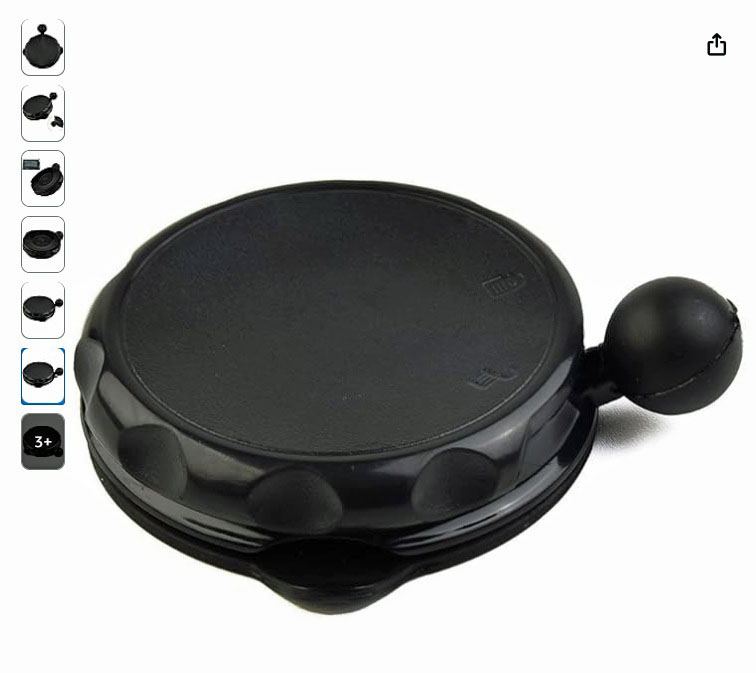
I tried contacting TomTom direct but there’s only the digital TomTom robo- assistance in the bottom right of their webpage which is of no help.
Can anyone help please?
I don’t have a TomTom but that looks like a standard 1" ball as used on lots of satnav devices.
So I would have thought an Amazon-sourced generic one would fit.
If you measure the ball on your existing one it will give you a guide.
RAM mount is a good brand if you want something a notch about the Amazon Chinese ones.
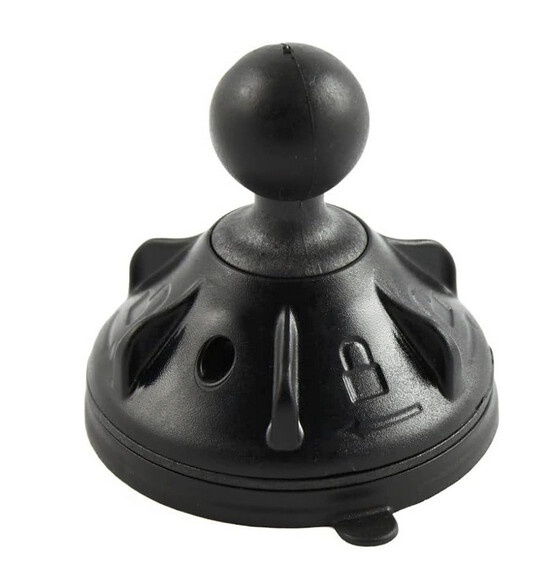
Lots more bits and bobs on RAM’s website. I use their kit to mount my Carpuride CarPlay device and also a GoPro on my motorbike. There are various arms that can be used to position the device exactly where you want it.
Thanks, but the ball size is 8mm dia - not very big. However, I just used my photo editor to reduce the size of the image I’ve shown above, until it was the same as the original in my hand holding it up against the monitor screen. It matches proportionally, so I shall order one and hope it fits. They don’t cost much. From 5€ to 10€.
Here’s hoping!
I have noticed a change in the operation of my computer recently. From time to time I have posted things from elsewhere using my mouse and the copy and paste icons top left.
A few days ago that no longer worked and I was puzzled as to why. Then I noticed that when I hover over those icons they suggest a different way of doing things. In this case I can only paste by using (Ctrl+V). Only a little more long winded and, now I know, of no great consequence, but does anybody know why this has happened completely without me making the change, unless I did it by accident? 
Just doing that smiley reminds me of another change, regular smileys that I use, such as that, rarely linger in the frequently used category and I have to go searching for them. It worked that time, but in 20 minutes? Not certain.
No replies to the above, surprising considering the number of techies here, perhaps I should have started a new thread?
Anyway, one more go, different ‘problem’. Finally gave into MS blandishments yesterday and upgraded to 11. Apart from the longwinded logging off last night nothing much has changed. Except. Partly obsuring my tab line at the top of the screen there is a set of 2 mini tabs, or at least there were ‘till I clicked on 2 of them in trying to get rid of them.
Now I have 4 mini tabs, the originals stating language and language location (UK) and Correction and Help, both of which appeared when I clicked on a mini button and thought by clicking on them when they appeared they would help get rid. Not a bit of it and I am now left with 4 mini tabs non of which are of any use to me and, by partly covering up the tabs I do want to use, are a bloody nuisance.
Please anybody, help me get rid of them. If no replies, because I know you are there, I will post the whole of the above in a new thread. 
Some screenshots would be helpful to see what the tabs are.
3 Likes