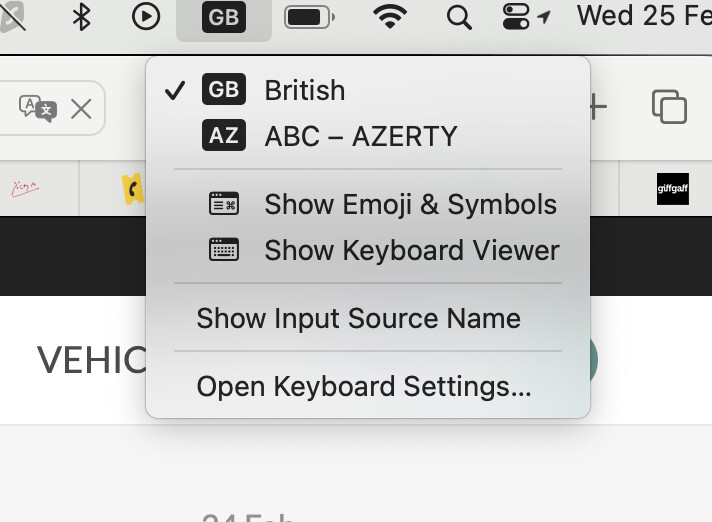
I think I’ve solved it !It’s complicated to explain, but it looks promising. The apple icon is now on my screen and my password was accepted. It is loading Tahoe now .
A comment I found suggested clicking on the little box at the top right of the screen. It gives a list of potential inputs and you have to choose the right one. It was all to do with the keyboard layout.
Happiness ! And we had a nice picnic in a little village in the sunshine earlier today, having decided to stop worrying about the Mac.
Thanks everyone for your ideas and suggestions.
Doh ! still having problems. Spinning ball, windows won’t move, can’t close windows. Maybe it will settle down by itself…… doesn’t react to mouse….. very slow. Not happy after all. Will battle on and use my iPad for uploading stuff to the web.
_—————————————————————————————see latest news.
Latest news, disaster AVERTED after contacting apple support. They told me exactly what to do using Messages and of course I obeyed and suddenly, after clicking on all the right things at exactly the right time, just as they said, it started to work properly in safe mode. Then I had to close it down and then restart to make sure it had restarted in normal mode. And it did ! I would definitely recommend apple support.
If so. I’m so sorry for not thinking of that in the first place, I remember that appeared after I tried out the Azerty keyboard and changed some settings. Doh indeed!
OH had the same experience. I must have done something bad….i had a telephone session with apple this afternoon, using the iphone camera to show them the screen, and following their instructions which involved turning off and on the Mac mini repeatedly and pressing certain keys on the keyboard. It was like black magic. Basically I think the problem was that certain apps had taken up a sort of permanent residence and I hadn’t noticed. Once we had got a screen with Force quit clickable, without the
spinning wheel, I used the 3 magic keys to pop up little windows that allowed me to force quit these apps, one by one until they had all closed down. My interlocuteur suggested it was like being busy all day, going to bed, having a good sleep and coming back the next day in good form. I haven’t been allowing the Mac to do that ! I’m going to sleep it much more often now.
I bought the latest MiniMac last November and a €14 tiny keyboard from LeClerc which has the Mac keys in Red and is Azerty on French setting. It’s a tnb make and you have to wait for a blue light to go out before pressing keys when starting out. The Mac keyboard was expensive on top of the nearly €700 I paid for the box so did not bother with it and this is fine, a bit smaller than what I as a touch typist is used to. Just as an afterthought as my SIL in Nashville set it up for me via his TeamViewer, he cleaned the new unit of anything on it, I am not at all tech savvy so just saying if you did not do it and apologies if I am trying to teach you to suck eggs as you probably know a lot about computers and I don’t.
I used to be much more au fait than I am these days. I worked with computers for years. But my memory is not good now . I choose passwords, write them down, then forget which password book I wrote them in and where I last put the little password book ! I do have a password app which helps a lot…. If I remember to put new passwords in there. The number of times I lose my glasses every day is indicative of the problem. You definitely did the right thing to clean up the new unit.