ZWO 585 MC Air camera / controller;
Skywatcher Star Adventurer GTI mount;
ZWO EAF auto focuser;
Neewer dew heater for the scope front element.
I got the SvBony SV241 power box in order to have just one power cable from the Ecoflow River 3, and to avoid the 585 MC air having to power the other stuff as well as itself.
It still needs USB connections to the mount and the focuser - the latter has to get its power from the 585 as it does not have a separate power input, but it’s only 5V.
Ok worth a try - if it goes for an hour on 240V AC (it’s currently done about 20 mins taking dark frames) then I’ll give that a go.
Yes I did that yesterday with the SvBony still in circuit, direct 5G to my phone, and it dropped after 20 mins. The camera cooler has been on (-10C) each time BTW.
Best I got this afternoon was 40 minutes before the wifi link went down.
I have tried with it on mains power and from two different Ecoflow powerbanks so i don’t think it’s lack of voltage or current. Especially as I am testing it with the camera unit alone, nothing plugged into it at all.
On the wifi front the built-in 5GHz seems to work best, but still drops eventually.
I have tried a couple of different antennae but they make no difference.
I even tried changing the IP range of my Netgear Orbi home wifi setup fron 10.0.0.x to 192.168.10.x but that too hasn’t helped. (The ZWO device uses 10.0.0.x for its wifi and that cannot be changed.
I have submitted a bug report to ZWO via their app, with logs, so will see if they come up with anything.
Sounds like you’ve done everything you can from a testing point of view. The only other thing I can think of is that there may be software updates for the physical camera, the inbuilt Asiair or the app. Do you also have access to another phone/tablet to try with that ? Good luck and let us know how you get on.
Oh yes - I have tried it with two different iPads and an iPhone 17. I even thought about buying a cheap Android tablet in case it’s an Apple-related issue!
Oh and I tried connecting from my desktop Mac using ZWO’s ASIStudio software. That connected via wifi OK, but then the application crashed after about five minutes!
The only thing left to try is to take the rig outdoors again and give it a go further away from my home wifi or other domestic interference. I will also try it out at my partner’s place in Cornwall in June.
And await ZWO’s reply…
If I can get it to run for 40 minutes or so without needing a wifi reset I can live with that. Otherwise ditching it and starting again with separate bits would cost me probably £500-£1000, depending on whether I could sell the 585 Air on…
And I don’t want to do that because it would require a separate guide scope (or perhaps an off-axis guider?) which would probably take it well over the mount’s payload limit…
ETA: my partner Di (who works in IT) sugegsted using a wifi analyser app to see if the 585 MC is fighting my home wifi for a channel, so I will also try that.
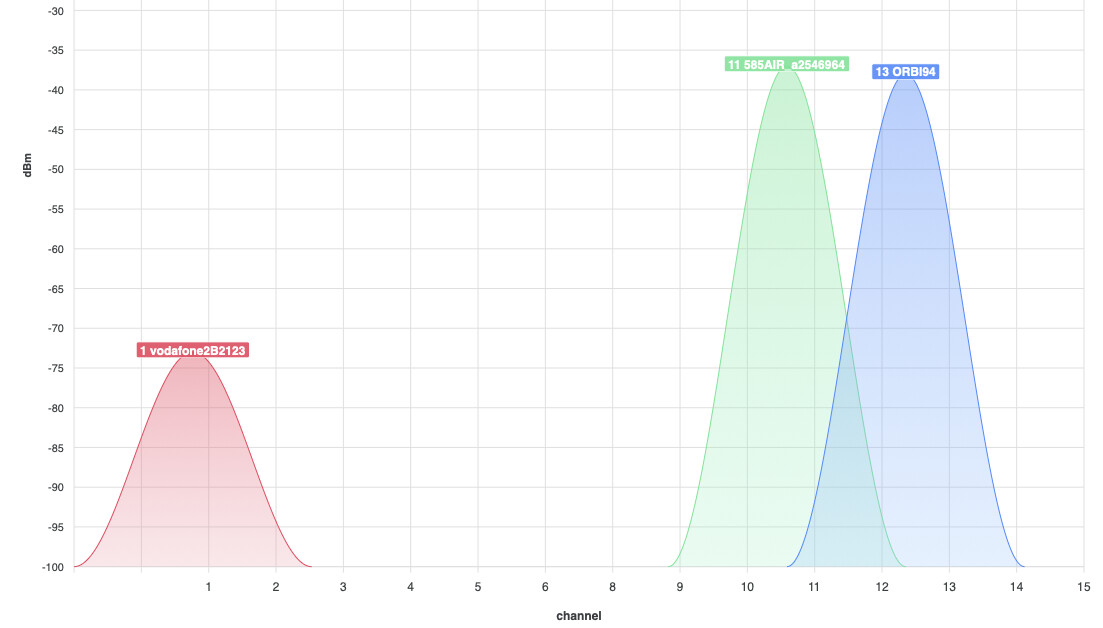
So I just tried the wifi analyser app, and it seems that the 585 Air uses channel 36 on 5GHz, which my Netgear Orbi system was also set to.
So I have been in to the Netgear admin page and changed the channel in there to Ch. 48.
The 2.4GHz band was set to “Auto” in the Netgear Orbi; the 585 air is on channel 11 - not sure if that would auto-switch; anyway I have set the Netgear to stay on channel 13 so hopefully that will reduce the chances of a clash.
Fingers crossed that both systems using the 5GHz channel was the problem!!
Incidentally, I notice from the wifi analyser that the power level of the 2.4GHz wifi from the 585 Air is actually slightly higher than that from the Netgear Orbi satellite box!
The Orbi box is right next to my Mac Mini on my desk and the 585 air is on a table a few feet away.
(Ignore the reading for the Vodafone router that’s at the other end of the bungalow).
So it can’t be lack of wifi signal that was causing the drop-outs…
After a series of emails with ZWO tech support in China, they have agreed that the 585 MC Air camera/controller is indeed faulty - having done exhaustive testing with a variety of devices from iPhone to Android to Mac to Linux (!) it’s still randomly disconnecting its wifi.
Initially they wanted me to send it back to Hong Kong for repair, but on further reflection we have agreed I will send it to 365 Astronomy in the rather closer environs of Worthing, who I bought it from, and who very fortuitously are the UK importers of ZWO equipment and have service engineers on site (a fact that I didn’t know at the time I bought it but am now grateful for!).
So hopefully in a month (or less) I will have a properly working device.
In an extra twist, ZWO have just been in touch again and they say they may be able to re-flash the Raspberry Pi motherboard remotely, withthe 585 connected to my Linux Mac Mini via USB, so the wifi dropout would not be an issue.
So I am going to see if that works before shipping it off to 365.
The internal RPi software is normally updated when you get an update of the app on your iPad. I think they must want to give you a test version with a potential fix for the issue. I didn’t know they were still using RPi boards in the MC Air cameras, I didn’t think they would fit inside the camera case.
I have no idea, I just assumed it would be the same hardware as in the standalone units.
As for it being a test version, again, no clue.
They have given me some rather vague instructions for how to connect the 585 MC to the Linux computer, which I have queried as they make no sense to me!
You just need to download the software I sent you, and connect the AIR camera to your computer via USB Type-C. To proceed, the device needs to enter loader/maskrom mode by holding the Wi‑Fi button while powering on. Could you please open the RK tool on your desktop and check whether the device has successfully entered loader/maskrom mode?
The “software” was a disk image (.img file) which won’t open on my Linux machine - double-clicking or right-clicking and choosing “Disk Mounter” does nothing.
I assume the “RK Tool” he refers to is another piece of software that I haven’t got. I held down the wifi reset button and powered on and the contents of the 585 MC’s internal drive appeared in the File Manager, but no sign of “loader/maskrom mode”.
If you have any insight on this I am all ears, otherwise I will have to wait 18 hours for China to reopen.
The .img file is almost certainly an image file for the onboard SBC, which is made by Rockchip. There is a package called RKTool used to download software images onto Rockchip STBs, which supports Linux and Windows. I assume this is what they’re talking about. It would probably be best if they sent you the tool with instructions to use the tool.