Setting up French TV for UK apps and Freesat

Not sure we’ve touched on this - well not this way of “doing” UK TV in France specifically - but it might be of interest as I know that many, possibly most of SF members prefer to have access to UK TV and catch up apps.

Of course if you buy a TV in France it is iset up for French channels, and French “smart” TV apps - no iPlayer, etc

Some bring TVs from the UK, some use various dongles and UK satellite boxes, some use commercial providers to wrap it up neatly and hide the techy bits. All are perfectly valid, all need a VPN somewhere in the mix.

But, if you don’t particularly want to watch French TV, or have a separate “box” from your ISP, what if it were possible to buy a set in France and simply download the UK catch up apps and configure it so that the experience is the same as a UK TV? Especially as sets bought in the UK are less likely to have a satellite tuner (however I believe Samsung has said all its sets will have a Terestrial/Satellite/Cable tuner from now on).

I’d been in the “bring a set from the UK” camp - it was easy pre Brexit after all - pick up a set in the UK, let it run through its set up, pop it in the back or your car and head over to France. Not so convenient now - for a start anything new which costs over 430€ would attract duty & VAT when imported to France. You can buy sets for less than that but it would make bringing anything which is a decent size over from the UK.

One of the things I was going to do this trip was bring our old set with me. We recently upgraded at home in the UK so I had a relatively recent (2022) “spare” 55" set - the one we had here is a 40" and it just looked lost in the corner of the lounge.

However I had a stupid idea to swap the tuner for a Freesat one and destroyed the set in the process - my own silly fault really. though it did set me thinking that it would be much easier if I bought one in France as a 55" set really only barely goes in the car.

It turns out it is possible with Samsung sets at least (well, specifically the QN80F but in principle any recent set) - you need a VPN and an older style remote which has number keys (the modern sets don’t have them but they are easily and cheaply obtained).

So I have my new French set with Freesat, iPlayer, ITV, C4 and Five catch-up apps all installed.

In a nutshell you need to make sure that any network it sees looks as though it is in the UK - if it sees a French ISP it will drop back to France, but when you get to the “Agree Terms” page you dial in the sequence Mute-Vol_Up-Channel_Up-Mute and it pops up a menu with a huge list of countries, scroll to the bottom and select “United Kingdom” then edit the Satellite list to remove Astra 19.2E as the default and set it to Astra 28.2E.

The only tedious thing was that, despite understanding that my UK postcode meant “Freesat, Midlands” it flatly refused to produce a sensible logical channel list with the standard Freesat channel numbers - however the set allows the channel lilst to be exported to a USB drive and imported back in and there is an open source utility called ChanSort which can edit them. You can do it on set in a couple of ways but that would take ages. Quite why the set allows you to do this I have no idea (I’m sure that the set at home doesn’t but I think it is only available when using a satellite signal) - but it does.

Wading through and putting in order 500+ channels is not all that much fun though (quite a few are duplicate or redundant but I only seemed to be missing one “official” Freesat channel).

1 Like

I have a Schneider TV purchased in France. Currently we receive UK television by means of a Humax Satellite box and a dish on the roof. The TV has a wifi connection to our internet router but that doesn’t seem to be of any practical use to us. We do not as yet have a fiber optic internet connection.
What I would like to know is what we can do to be able to continue to receive UK televison after the satellite signal goes away in a couple of years time ?
I’ve looked at other threads that touch on the subject but I quickly become lost in all the technical jargon that I don’t understand.

Assuming it has hdmi inputs then a Freely box and a VPN should do the trick.

1 Like

That is the most legit way to achieve a live UK provided you are okay with breaching the apps Ts&Cs by using a VPN.

Yes, the TV has 2 HDMI slots with the satellite box connected to one of them at present.
Am I right in believing that the Freely box is a physical thing that I buy and connect to the TV and that presumably the Freely box connects to the router by either wi-fi or a cable ?
I don’t really understand about the VPN other than it masks one’s true location. Is the VPN a physical box or something which is downloaded onto the laptop, in which case would I need the laptop to be running in order to watch TV ?

I know that I’m going to have no choice other than to have a fiber optic internet connection in due course, and that whoever does the connection will install a fiber optic terminal box of some sort.
Am I right in assuming that I will still need a router box which will be connected to the fiber optic terminal box, and that then I connect the laptop to the router by wi-fi as at present ?
Also, will there need to be a cable between the router and the fiber optic terminal box ?

Bouygues fibre installation involves a junction box on the wall where the fibre enters the premises that feeds into the Bouygues modem which is called a “BBox”.

Presumably there is some sort of cable between the two items ?

Yes. Depends a little how things are set up but there will either be an optical cable from the box on the wall to the router or an Ethernet cable.

1 Like

Yes, an optical cable that connects into the Bouygues modem.

Said modem provides a WiFi network and mine has 4 Ethernet ports on the back for wired connections.

OK. No problem with that provided they will bring the fiber cable into the house where I would like it to be. (A different room from where the existing phone line comes in.)
I understand that the laptop and the TV will connect to the router by wi-fi, but how does the VPN business fit in ? Surely it cannot be installed on a router that doesn’t belong to me ?

VPN’s don’t need a physical extra box unless you need to connect something which needs to connect via a VPN, but which cannot itself run any VPN software.

Unfortunately the Freely decoders (eg - the Manhatten Aero 4K) don’t support VPNs themselves.

Usually yes, assuming that it is a reasonable entry point and there is power available where you want to site the router.

This is where it probably gets more technical than you want. If you need a VPN on the laptop it is just software that you install. The Freely box - at least the ones that you can buy today, would need either the router to support a VPN, which ISP routers don’t generally do - or - something has to place itself between the Freely box and the Internet to make the VPN connection.

So the TV has a cable to the Freely box which then has a cable to the laptop that has a VPN downloaded onto it, then the laptop connects by wi-fi to the router which in turn connects to the fiber terminal by another cable. Yes ?
So basically, I have to have the laptop switched on in order to be able to watch UK television. Yes ?

Not exactly. You could set it up like that but using a laptop that way would need a fair bit of technical know how and would not be ideal.

Let us say that - as thing stand - you would have the Freely box, connect to a.n.other box which in turn would connect to the router. Yes that other box would need power.

For example chez moi the SFR Red router is in the garage and that’s no use for WiFi access - so I don’t use its WiFi, it’s turned off. I have a second WiFi access point in the house - which also has the VPN connection so I don’t need yet another box on top of what I already have.

By the time you actually need this setup it is always possible that someone will implement it as a single box solution. E.g if Amazon put a Freely client on the Firestick, which already supports VPNs, you would have just one thing to plug into your TV.

Providing electrical power is not a problem.
So what is the a.n.other box called, or are you not allowed to say, and do you have any idea about the cost involved ?
Also, I suspect that I’m going to lose the ability to record a TV program for later viewing which I have at present ?

I suspect you would need help to set it up but any existing router that can have OpenWRT installed would do fine. Doesn’t even need to be new, you could pick something up from eBay - so, peanuts, basically. Except that installing OpenWRT is a job for your local tame nerd.

That depends on the Freely box in question but recording TV is not something you are expected to do - that’s what “catch up” services are for.

Be a bit careful with “Freely Recorders” - the Humax Aura EZ 4K Freely Recorder sounds like it should do what you want but it won’t actually record Freely channels.

I agree. I expect that in the end I’ll just have to tell someone what I want to be able to do and get them to make it so.
I just want to be able to watch UK television and record a program for later viewing so that I actually have the recording here, rather than having to press lots of buttons on some catch-up service which may, or may not, have what I want to watch available. Also I wish to be able to record a program while watching a different one.

Please know that I do really appreciate your time and help.

I have to admit that I do find having to change the system / equipment very annoying. The satellite dish and the Humax box are so simple to both install and use.
Oh well, tis probably time to put the subject to bed, and myself as well.
Thanks again.

I am not following this thread in detail, so maybe missing something that has already been said. I have not relied on recording anything for yonks now as the ‘I-player’ facilities offered by the TV companies are now so sophisticated for catch-up TV.

I have ditched my big 2M dish and Freesat TV now in favour of a Manhattan Aero 4k ‘Freely’ box connected to an HDMI port with the TV accessing a basic router, set up with ‘L2TP’ to a (StreamVia) VPN, hanging off my main Starlink router. This means that the Manhattan is in effect always connected to the UK. The Manhattan box was 100€ and the VPN is £50 odd p.a. Works a treat and a much cleaner solution than a giant dish outside.

Yes, it means using a separate remote control to access the Freely UK channels and I-players, but I just cannot fit a 65" tv with integrated Freely into any of my cars and no way am I going to push a Transit van 1200kms up and back..:joy:

2 Likes

That should be possible, in the UK, I ran in a length of conduit (gaine) from the front of the house to where I wanted the router, it contained a draw string to make it easy for the installers to pull through the fibre. They thanked me and said, wish all our customers would do this! Only took them about 45 mins including the setup.

2 Likes

I was quite lucky in that the existing phone line came into the house pretty much exactly where I wanted the optical fibre so the guy was able to run it without drilling a new hole. Somewhat to my surprise he had to attach a new anchor to the house for the overhead and said they had to keep well clear of power and existing phone lines.

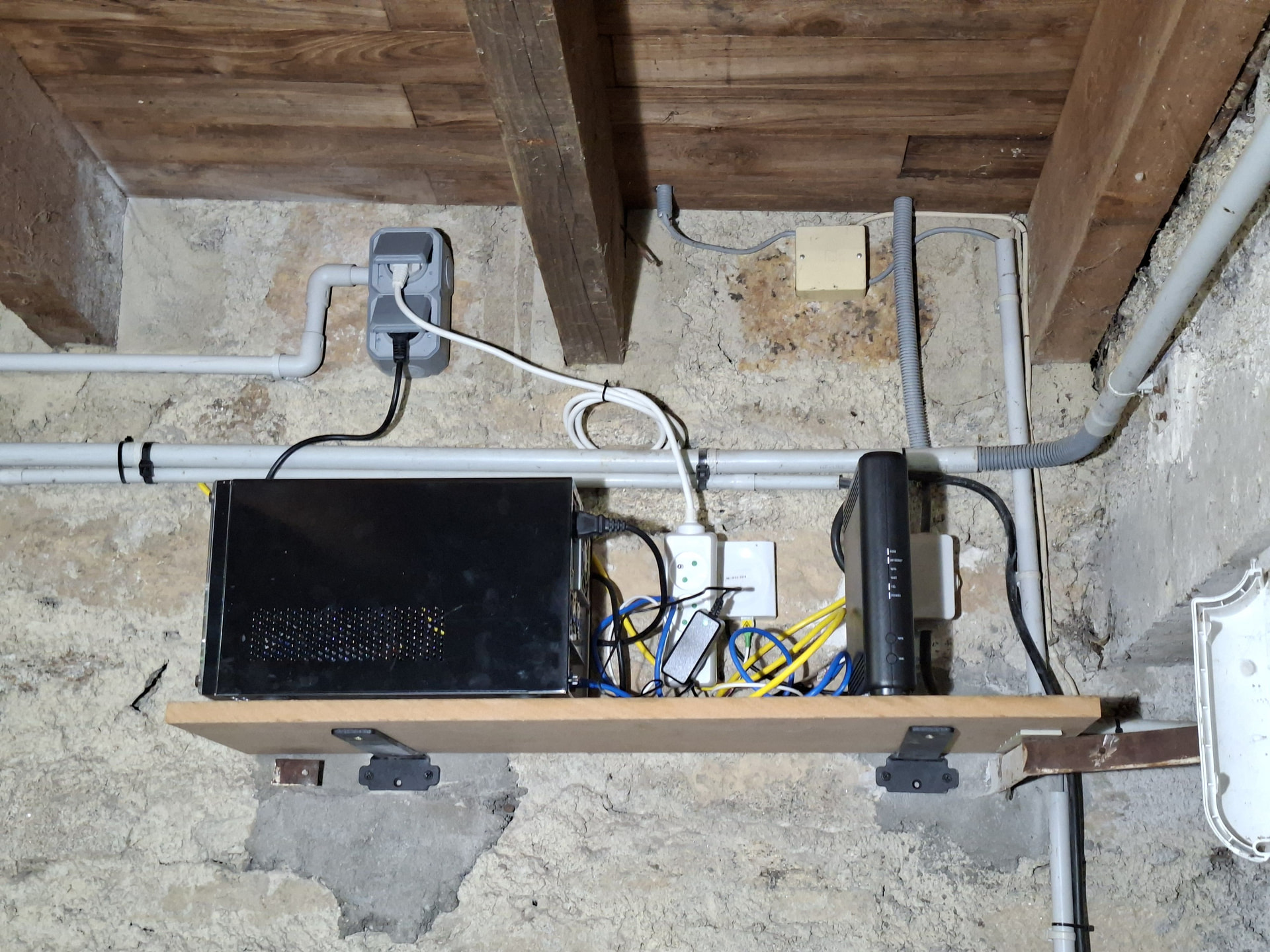
So now I have a little shelf with the router and my media server

tucked out of the way in a corner of the garage.

the small square box top right is where the original phone came in so I can tap into that to run analogue phone lines into the existing sockets in the house - which is on the “to do” list but not very high.

2 Likes