Talking of scams - beware of Amazon Resale

Or Amazon Seconde Main en France.

At least as far as computer supplies go. Was looking for a new CPU and decided to go for an i9-14900k - for various reasons of price, current DRAM prices, to what extent a new CPU will provide a meaningful upgrade in performance and need, or not, for a new motherboard.

Amazon sell new CPUs, of course. They also offer “customer returns” - I guess I knew it was a bit of a gamble but 30% discount on a new CPU is a lot of money off a four hundred quid item so, almost by way of experiment, I ordered.

To my lack of surprise what arrived, although appearing to be unused, was fake.

Intel CPUs have a serial number - the last four digits of which are printed on the edge of the CPU and the full version of which is on a 2D matrix barcode on the heat spreader), there is also a batch code which specifies where, and when, the part was fabricated. Intel also provide tools to check these and indicate how much warranty the chip has. None of them matched so what I received was most likely a different CPU which had had fake markings applied.

To be fair this is not exactly  Amazon’s fault - the part might have been returned for any number of legitimate reasons given the distance selling regulations but it is also known that some might abuse these - ordering a new item but returning a previously damaged one, or buying a genuine item and returning a fake - in fact there is an infamous story of how lack of quality control when it comes to Amazon placing returned items back to stock wrecked one “mom and pop” business completely.

So, no matter how tempting the prices, I would advise anyone considering buying an Amazon return to think twice. I was aware of the risks and knew how to check what I received. I suspect, looking at the many poor reviews that quite a lot of people only found out when their computers crashed and were unreliable.

Let’s be careful out there :slight_smile:

10 Likes

So this would be what used to be 'amazon warehouse? I bought some Oral B toothbrush heads - twice I think. The first seemed fine - all sealed though saying may be open box. . The second was definitely ‘open box’ with the heads not individually sealed, just placed in a cardboard holder inside the open box.

I don’t think these are genuine - the colour is slightly off and the colour wear as you use the brushes is definitely not like oral B. So possibly someone taken the originals and returned box with ‘copies’?

1 Like

Quite likely.

I’m at a bit of a loss with Amazon today - the replacement, “new” CPU turned up earlier. Although the serial and batch numbers correspond the box had clearly been opened - but not by going through the factory seal but by carefully (but not carefully enough as it was ripped) loosening the label on the other side. Which implies malice because the aim was clearly to bypass the tamper seal.

WTF Amazon, What the absolute F?!!?

3 Likes

Write and complain to the consumer section of the Washington Post :thinking:

2 Likes

Life is too short.

1 Like

Which is precisely why they do it. For example, buy a genuine DeWalt, send back a copy.

2 Likes

But if nobody complains …

1 Like

Ah, yes now I recall that is a known eBay scam, the buyer return a damaged non working item or a different item and eBay returns the sellers money to the buyer anyway under their buyer protection.

1 Like

Buy a genuine DeWalt and send back a Black & Decker :face_with_hand_over_mouth:

Despite having a couple of perfectly serviceable, albeit with the older battery shape, DeWalt drills, I couldn’t resist buying this a few years ago. There’s one born every minute :face_with_hand_over_mouth:

I don’t even do much drilling these days. My first power drill was a Black & Decker that I got on Green Shield stamps. I had a summer job pumping petrol in Crystal Palace and I just collected the stamps customers didn’t want. I think the drill needed the most books of stamps of anything in the catalog. It took a long time for my tongue to recover :face_with_hand_over_mouth: I think the drill may still be somewhere in the cave with its three pin plug still on it.

I’ve bought a couple of items 1 on resale / Amazon Warehouse, 1 normally sold by third party sellers on Amazon, that were far from the condition described in the listing (laptop and another electric thing). Both were sent back and I entered a note as to what was wrong with them, and money was refunded instantly. I then went on to find the perfect replacements on Amazon shortly after.

Most of the time Amazon has credited my money back on any return as soon aa the item has been handed to post or courier co with the label Amazon sent me for return, on it. No need to wait till the item reaches them.

In both the cases I’m thinking of the seller was a third party on Amazon so I’m very happy with Amazon’s promptness in refunding and immediate acceptance of the photos I sent.

3 Likes

Yes, at least Amazon do generally make it easy to return items but you need to check whether it is handling customer service if it is a third party seller.

2 Likes

I believe Bezos picked up the 767 cheap on Amazon Seconde Main…

Edit: When I posted there was no mention of casualties :slightly_frowning_face:

I had a problem a few years ago buying bulk purchases of 2CR5 lithium-manganese batteries. I twice bought a pack of 10 batteries, checked the voltages with my large and very accurate (since re-calibration) Avometer 8 Mk.7. They were all over the place from the correct for a new battery 3.2V down to 1.4V. I sent them to Duracell France explaining bought from Amazon. Duracell very kindly replaced them all and explained the Amazon scam. Someone buys 10 genuine 2CR5 batteries from Amazon, then claims they are not what they needed returning them but of course the batteries they return are fakes. On return, Amazon employees just chuck them back in the same picking bin that the genuine ones come out of, so it is a lottery if you get genuine batteries or fakes. Duracell say they have threatened to stop supplying Amazon unless they do something about this process.

Wilson

1 Like

Excellent customer service from Duracell.

2 Likes

Why buy an i9 cpu without a new motherboard?

Sounds like you thought you could just slot it into an old i5 board - north and south bridge chipsets are totally different also the pinning, voltage etc won’t match anything worth upgrading.

For £20 a month you can access cloud systems running at speeds you could never afford with AI support that is very powerful - in 12 months your new chip will be redundant even if you could install it into your old board. If you want it purely for local processing IE high end local games, and video processing then you would already know the whole system needs to be updated, not just the CPU? The biggest bottleneck in today’s world is local ‘on chip cache’ broadband speed and whatever server you are connecting to.

Well that’s an odd, and I must say rather impolite response which presupposes quite a bit about my IT knowledge and what I want out of my kit, while simultaneously revealing your own ignorance.

i3, i5, i7 and i9 tell you nothing about motherboards, sockets or chipsets, they are marketing labels applied by Intel to denote CPU performance bands - “entry”, “budget”, “mid-tier” and “performance” - now replaced by “core ultra” 3, 5, 7 and 9.

Motherboard compatibility is determined by chipsets, there isn’t such a thing as an “i5” motherboard, new or old, all Intel motherboards will run all CPUs i3-i9 for their compatible generation(s). It is true that a motherboard with an i5 might well also have a more budget chipset - a 760 or 770 rather than a 790 say for 12th/13th/14th gen CPUs and so won’t be able to get the absolute best out of a “K” or “KS” part but it will work just fine otherwise.

As it happens the 14900K did not go in “an old i5 motherbard” but one with a Z790 chipset - which is the most capable chipset for 12th-14th gen.

Er, well, possibly because it will be faster in the motherboard that I already have.

Anyway - none of my complaint was about performance, it was about receiving fake or previously opened chips.

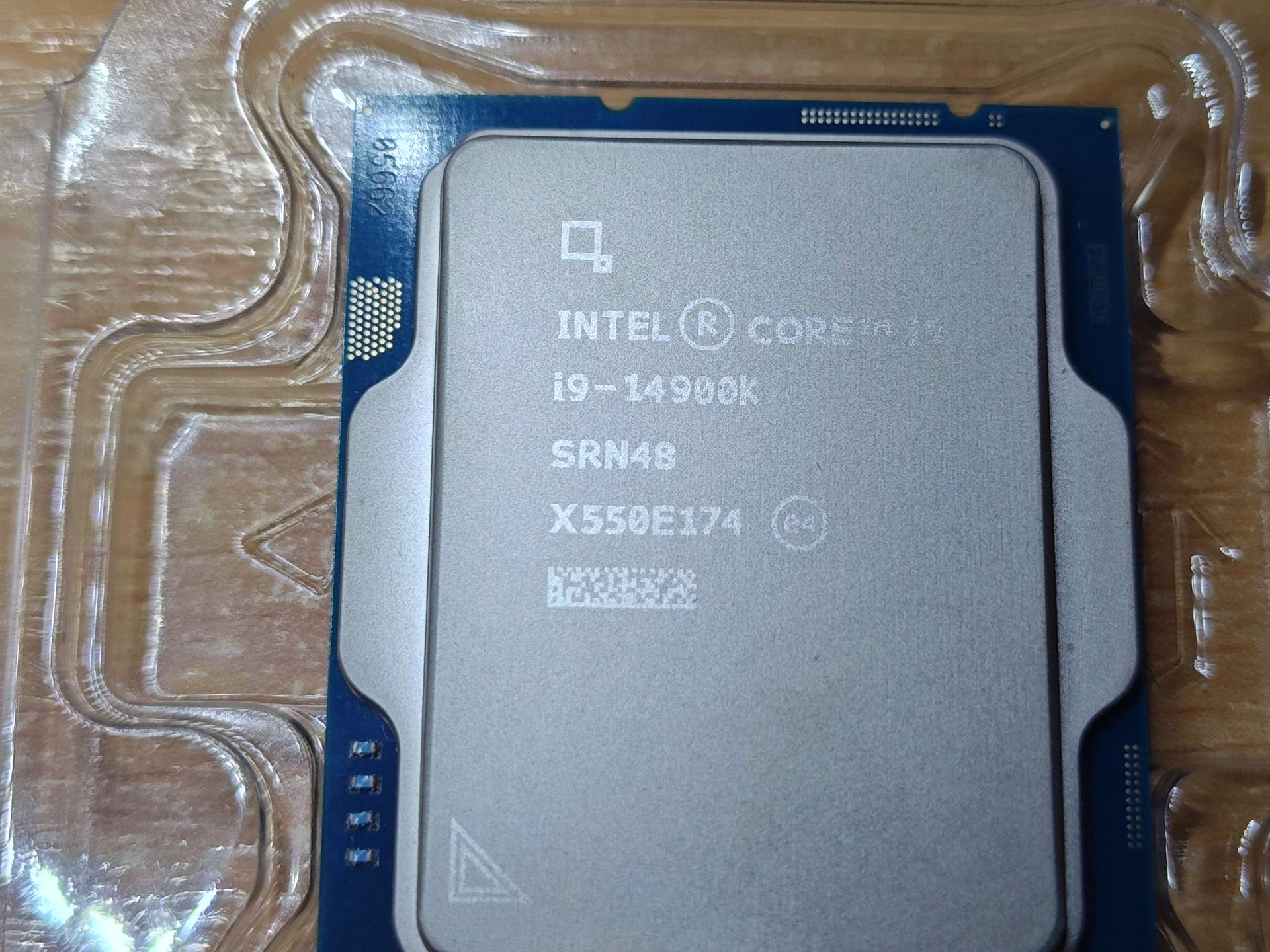
Here is the shot of what turned up.

The partial serial number on the chip itself is 05662 - checking against the batch code shows it corresponding to a tray i9-14900K but that the full serial number should be CM8071505094017; in fact the serial number coded on the 2D matrix is U5D50F4500978 - that should have a batch code of X508N897 though FWIW it is at least supposed to be a retail boxed part.

The fact that the partial serial number does not match the full serial number suggests the IHS could have been swapped - we can’t go from just a partial serial number to a CPU type but it’s probably a more budget i9. However it’s not just an IHS swap - the batch number and serial number on the IHS don’t match each other so they must be completely fabricated - or copied from genuine but different CPUs.

I generally am interested in building two types of intel system - performance systems for gaming, though there isn’t much point as I don’t get the time at all these day - my gaming system is still a 10th gen CPU - and low power systems such as my NAS which is the focus here. This has a very tight space for the motherboard (see previous photos) so hitherto I have used the “T” low power parts - currently it is an i7-12700T in a Z790 board.

As it happens I have two such boards. The previous Z690 m/b died so I ordered a replacement - which didn’t arrive. As this is my main file server and email server I didn’t want it offline longer than necessary so I bought another one. That turned up next day, a bit later the original made an appearance and through laziness as much as anything it wound up on the parts shelf rather than getting sent back. Always keep a spare!

Modern CPU’s can just be told to stick within a specific power budget so the question becomes - is the i9-14900K better when run at low power (~65W) than an i7-12700T. It’s complicated as there are trade offs - it has more E cores but no hyperthreading, generally does more IPC etc, so I haven’t quite decided if it is worth swapping.

If not I have a son who would love an excuse to claim the new CPU for his gaming rig - which is why, BTW why I tend to buy motherboards with chipsets which support overclocking. For one they also support underclocking and undervolting which the more budget chipsets don’t and second, I might need to repurpose them to a more performance-oriented scenario.

Nah. That is you can rent an AWS CPU for twenty quid a month but you aren’t getting cutting edge NPU enabled chips for that, you get a “Small EC2 Virtual Server”.

Yes, I can install it in the boards that I have, thanks.

But Ok the 15th gen “core ultra” 2xx CPUs are out. Why not get one of those - because a) they are more expensive b) apart from the NPU are not much more performant than 14th gen; they have lower boost clocks and no hyperthreading - the Core Ultra 9 is really very similar to the i9-14900K with same number of E and P cores, for instance and costs ~£600 rather than ~£400 c) need a new motherboard adding another £200-400.

At least both Z690/790 and Z890 are DDR5 - as will be the upcoming chipsets so for the moment I don’t need to buy more RAM (which is welcome as it costs the Earth at the minute).

But for now I don’t need cutting edge and don’t have much interest in running LLM’s locally (the performance boost for large neural models isn’t great anyway).

4 Likes

I was sitting here, popcorn to hand, waiting for your arrival :blush:

5 Likes

Have you tested it yet? I would think a 14900K will give you a nice boost.

As I said it’s “complex” and it’s a bit of a case of"if you cut everyone off at the knees they all look the same height".

The two CPU’s 12700T and 14900T are actually very similar. The “low power” CPU takes 35W which equates to about 2.2GHz in it’s 8 P cores under sustained load. Lifting that power limit to about 70W gets about 3.3GHz and 2.8GHz on the E cores.

The 14900K has the same number of P cores and quadruple the E cores for a total of 24 cores and up to 32 threads, the cores themselves are almost identical - the P cores have a bit more L2 cache than on 12th gen but that’s it.

So, to run double the cores takes more power - that means if I fix the power limit the same as the 12700T it will have to throttle each core down so the overall power is the same. The 14900K of course does not want to run at 70W, it wants to run at a base power of 125W and maximum draw of 253W but if you constrain it, unsurprisingly, it turns in similar performance.

BUT, I can disable SMT (hyperthreading) - the core ultra CPUs drop SMT anyway so those used to Intel CPUs have to get comfortable with 1 core = 1 thread going forward. That saves quite a bit of power (it’s an old overclocking “trick” to disable them) so, for a power budget of 85W I can have the P-cores at 3.5GHz and the E cores at 2.9GHz and 24 threads compared with 20. A single E core should add more performance than adding a thread to a P core (SMT adds ~25% performance, an E core is ~40-50% of a P core but it is variable and depends on workload).

I could probably get similar clock speeds from upping the power budget on the 12700T a bit more - I think I’ll aim at 125W PL2 and 85W PL1 either way but the 14900K should win with 20% more threads, and moving 8 threads from virtual to physical cores should also increase performance, even if they are E cores - so I’m expecting about 33% more performance.

I’ve tried benchmarking to get a performance comparison rather than a CPU GHz comparison it but can’t get the server quiet enough at baseline for a meaningful test.

Whether 33% is enough to swap the CPU and deprive my son of a better gaming rig is something I haven’t decided yet :slight_smile: :slight_smile:

Get an A1 processor, best bang for buck… :slight_smile:

4 Likes